Transparent Selective Sync: file system extensions errors
These errors may appear on Windows and macOS Agents with Transparent Selective Sync enabled. These are errors returned by the operating system and they relate to job folder mount locations or the file system extensions in general.
Windows
sync root
The sync root phrase in error messages is an operating system's term that means the root directory for creating placeholders.
Error message: Cloud Filter API is not available
Error code: SE_CF_API_NOT_AVAILABLE
System requirements are not met. Transparent Selective Sync requires Windows 10 build 1809 or newer, Windows Server 2019 build 1809+. Also requires Cldapi.dll to be present in C:\Windows\System32.
Error message: Failed to initialize sync root manager registry
Error code: SE_CF_REGISTRY_INIT_FAILED
Error message: Failed to register sync root (Do not attach the filter to the volume at this time)
Error code: SE_CF_FAILED_TO_REGISTER
Error message: Failed to unregister sync root
Error code: SE_CF_FAILED_TO_UNREGISTER
Agent was unable to register or unregister key \HKEY_LOCAL_MACHINE\SOFTWARE\Microsoft\Windows\CurrentVersion\Explorer\SyncRootManager\
- Check if the Job folder is located on a non-NTFS storage volume. Transparent Selective Sync is compatible with NTFS file system.
- Make sure the Agent runs under a user account that has permission to edit Windows registry.
- Agent was initially set to use an invalid Job path, and then switched to a valid one. Such change cannot be applied immediately, and the Agent must be removed from the Job, and then added back with the correct path.
Error message: Failed to connect to sync root
Error code: SE_CF_FAILED_TO_CONNECT
Error message: Failed to disconnect from sync root
Error code: SE_CF_FAILED_TO_DISCONNECT
- The Job folder is located on a non-NTFS file system. Transparent Selective Sync requires NTFS file system.
- The Job folder is located on a non-local drive. Transparent Selective Sync cannot be used for Job folders located on a network share or root of a mounted network share (
Z:\foo). Though the selective sync folder is available remotely through SMB. -
Another application or
Explorer.exekeeps exclusive handle to the directory. For example, using the same folder for a Transparent Selective Sync enabled Job and OneDrive won't work. To find such an application, you can use Process Monitor tool and check which process operates in this directory and its access level.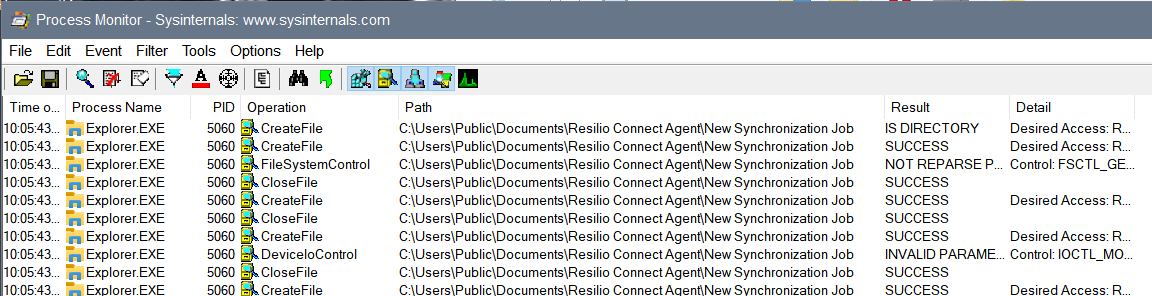
-
Two Resilio Agents run on same computer that are set to selectively sync the same directory or a nested folder.
Error message: Create symbolic link failed
Error code: SE_CF_FAILED_TO_CONNECT
When mapping Enterprise Hybrid Work Job folder to a drive, the drive letter must be in uppercase, e.g., Z:.
Error message: FspFileSystemCreate failed: c0000022
Error code: SE_CF_FAILED_TO_CONNECT
Restart your computer after updating the end-user Agent.
macOS
Error message: Helper Tool is not enabled: <error-status>
Error code: SE_CF_FAILED_TO_REGISTER
The Helper Tool is not enabled error relates to the macOS Agent failing to run the Helper Tool daemon that is required for the Agent to interact with the file system.
The error message includes a status code, which indicates the reason for the failure.
| Status | Description |
|---|---|
| 0 | The Helper Tool service has not been registered.
|
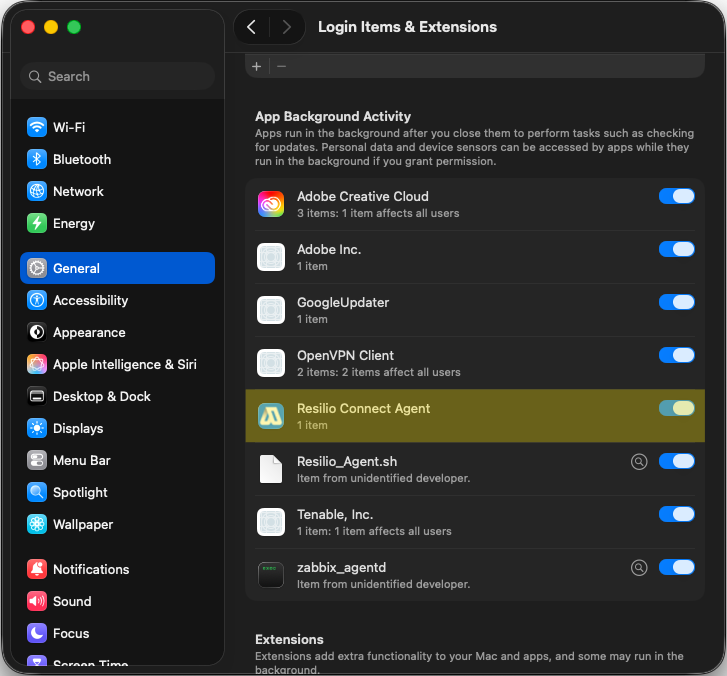
| 2 | Resilio Agent on macOS is missing permission to run in the background. To resolve this, select System Settings > General > Login Items & Extensions, then in the App Background Activity section enable Resilio Connect Agent. |
| 3 | The Helper Tool service could not be found.
|
Error message: Resilio FS is disabled
Resilio Agent requires enabling the Resilio Connect Agent extensions and background activity to work properly. To resolve this issue, follow these steps:
-
Enable Resilio Connect Agent extensions:
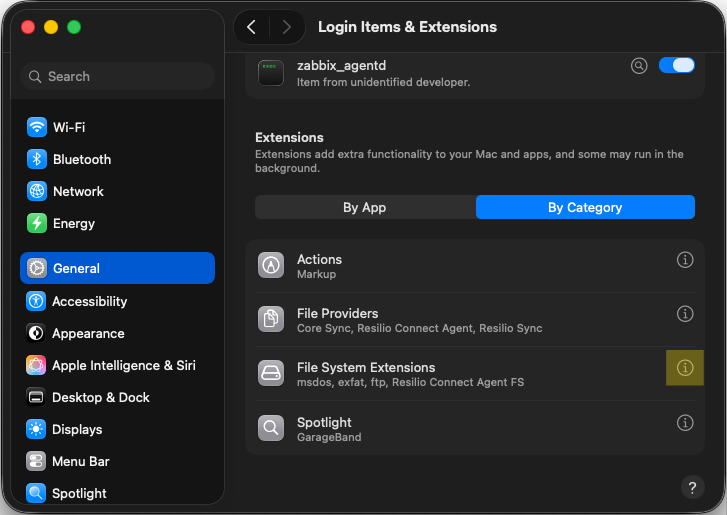
- In System Settings, select General > Login Items & Extensions.
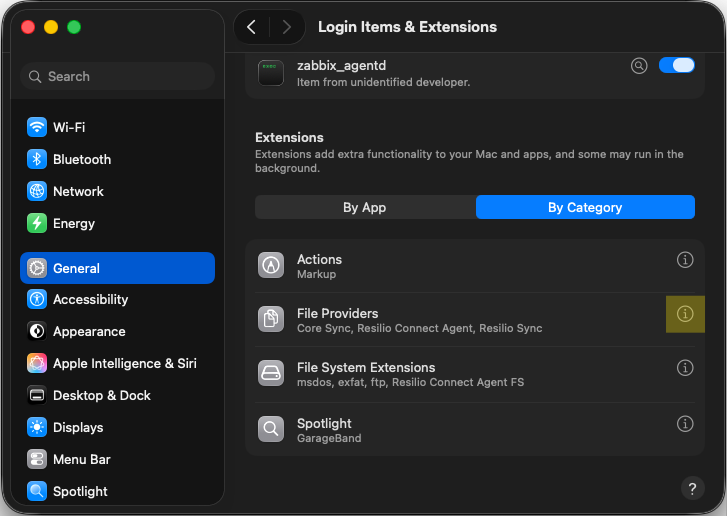
- In the Extensions section, click By Category.
-
Locate File Providers category and click the info icon to manage file providers extensions.
-
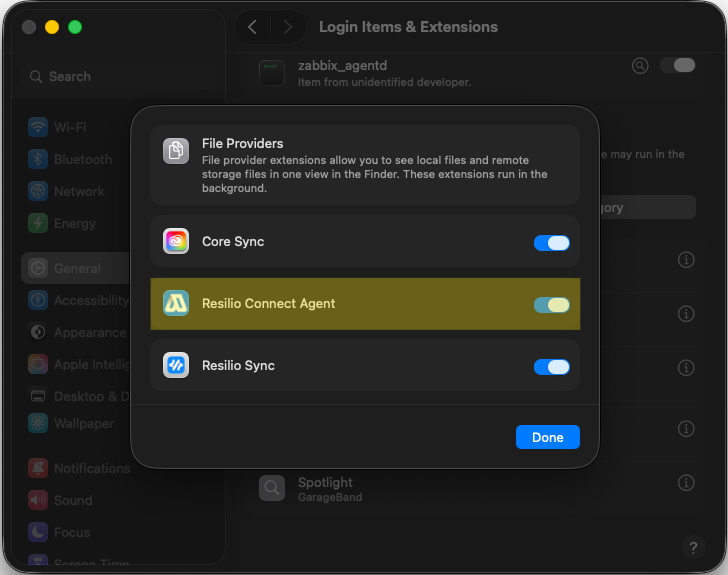
Enable Resilio Connect Agent extension, then click Done.
-
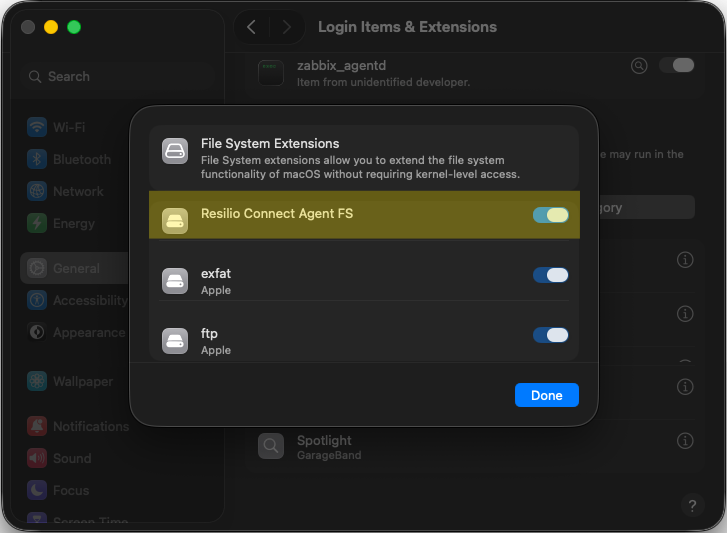
Locate File System Extensions category and click the info icon to manage file system extensions.
-
Enable Resilio Connect Agent FS extension, then click Done.
-
Enable background activity for Resilio Connect Agent:
- In System Settings, select General > Login Items & Extensions.
-
In the App Background Activity section, locate and enable Resilio Connect Agent.