Using Agent API
Agent API can be used to control client behavior locally without the need for UI. It is supported only for desktop Agents.
Enabling and configuring agent API
To enable Agent API for an agent, add the client_api_enabled custom parameter with a value true to an Agent Profile.
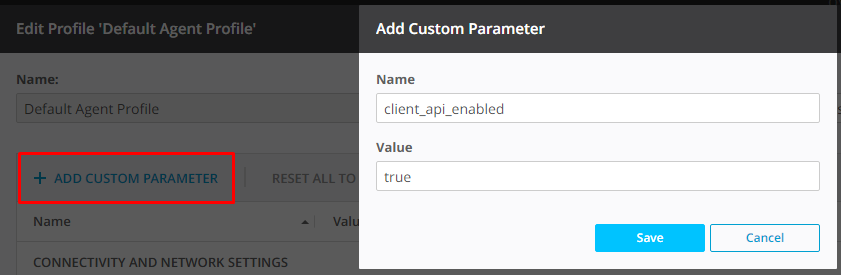
Agent binds to 127.0.0.1 interface to listen to API calls.
Note
It is not possible to bind it to a different interface.
Agent API receives requests over 3840 port by default, but it can use a different port. Specify the desired port as a value of a client_api_port custom parameter.
By default, a token is included in all API calls to protect against cross-site request forgery. Add custom parameter client_api_token_auth with a value false to disable the need for token when accessing API.
API calls
Get Token
Get security token. Use token in subsequent API calls to prevent cross-site scripting attack.
GET http://localhost:3840/api/v3/token
Sample response
Get Status
Allows to see current status of the client.
GET /api/v3/client?token=xxx
Sample response
{
    "deviceid": "EA...JA",
    "deviceidHex": "201...20",
    "name": "AgentName",
    "paused": false,
    "restartRequired":"true", //from v4.1.0. Missing, if restart of the Agent is not required.
    "server": {
        "addr": "management_console.com",
        "last_seen": <unix_timestamp>,
        "state": "CONNECTED"
    }
}
| Field | Description |
|---|---|
| state | Possible values:
|
Get status of jobs
Note
Available in Resilio Active Everywhere 3.0 and newer.
Reports status for job runs or a specific job run. Fields are self-descriptive.
GET /api/v3/runs
GET /api/v3/runs/{run_id}
Sample response
[
    {
    "down_speed": 177840,
    "errors": [],
    "eta": 101,
    "files_completed": 208,
    "files_total": 209,
    "id": 384,
    "name": "FullSync",
    "path": "C:\\UserData\\FullSync",
    "peers_count": 1,
    "peers_count_proxied": 0,
    "permission": "rw",
    "run_id": 543,
    "size_completed": 126936039,
    "size_total": 144943317,
    "status": "syncing",
    "transferred_down": 107847067,
    "transferred_up": 0,
    "type": "folder",
    "up_speed": 0,
    "last_synced": 1702985796
    }
]
| Field | Description |
|---|---|
| type | Possible values:
|
| status | Possible values, applicable to all Job types:
|
| last_synced | Unix timestamp for the last of time agent switched from non-zero data difference to zero data difference (which usually indicates that agent finished syncing). |
Pause / Resume
Allows to pause/resume agent instantly or set resume timer to automatically resume after some time. The pause here stops all agent activities, including network activity, like file tree merge and service information exchange between agents. While agent is paused, it reports to the Management Console ‘paused’ state for every transfer.
PATCH /api/v3/client?token=xxx&paused=true&resume_timer=60
Applicable parameters
| Parameter | Description |
|---|---|
| paused | Can be true or false to pause and unpause agent respectively. |
| resume_timer | optional, a time interval after which agent unpauses, takes value in seconds If resume_timer is omitted, agent will remain paused until restarted or unpaused over another call with paused=false. Whenever agent gets restarted or unpaused, resume_timer is reset. |
Restart the Agent
Note
Available in Resilio Active Everywhere 4.1 and newer.
PATCH /api/v3/client
Body:
Set tag
Note
Available in Resilio Active Everywhere 2.9.3 and newer.
Assigns a tag with value to the Agent. Creates new tag if it does not exist or updates existing one if tag already exists. Allows agent to migrate between groups with automatic sorting rules, as well as pause-unpause jobs using the "Pause job if" parameter in job profile (only available starting from 2.9.3).
PATCH /api/v3/tags?token=xxx
Body:
Sample response
{}
Get tags
Note
Available in Resilio Active Everywhere 2.10.0 and newer.
Lists all tags and their values for an agent.
GET /api/v3/tags?token=xxx
Response sample:
Get Files, Patch Files
Note
Available in Resilio Active Everywhere 5.0.9 and newer.
Lists, hydrates and dehydrates the files in a TSS folder. Requires system_native_placeholders: false and enable_placeholders: false parameters in the Agent Profile in order to disable creation of system placeholders on the storage.
Lists all files in the given directory
GET /api/v3/files
| Parameter | Type | Required | Description |
|---|---|---|---|
| folder_id | integer | Yes | Job run id of the folder (as from GET runs call). |
| path | string | No | Relatvie path inside the folder tree. Empty by default (root). |
| list | boolean | No | True by default. Defines the response format (see below). |
list=true (by default): array of file objects.
- If
pathpoints to the list (not the root and not the folder) - array with one element (the node itself). - If
pathpoints to the root or the folder - array with direct child elements. - If path is not found - empty array [ ] (error is not reproted, but is recoded in the Agent's debug log).
list=false: one object with information about the node by path. If the node is not found - empty object { }.
Response sample:
{
  "name": "string",
  "disk_name": "string",
  "type": "string",
  "state": "string",
  "download": "int (bool)",
  "always_download": "int (bool)",
  "invalidated": "int (bool)",
  "ignored": "int (bool)",
  "time": "int64",
  "mtime": "int64",
  "ctime": "int64",
  "disk_mtime": "int64",
  "disk_ctime": "int64",
  "inode": "int64",
  "perm": "int64",
  "ignored_modified": "int64",
  "exists_locally": "int64",
  "etag": "string",
  "hash": "string",
  "is_system_placeholder": "int",
  "owner": "string",
  "has_remote_copy": "int64",
  "pvi": {
    "type": "string",
    "size": "int64",
    "mtime": "int64",
    "ctime": "int64",
    "hash": "string"
  },
  "errors": [
    "int64"
  ],
  "folder_exists_explicitly": "int64",
  "have_pieces": "int64",
  "total_pieces": "int64",
  "size": "int64",
  "link_target": "string",
  "acls": {}
}
PATCH /api/v3/files
| Parameter | Type | Required | Description |
|---|---|---|---|
| folder_id | integer | Yes | Job run id of the folder (as from GET runs call). |
| download | boolean | Conditional | Select/Unselect for regular file fetch. |
| always_download | boolean | Conditional | Select/Unselect for file pin. |
| path | string | Conditional | One location for hydration/pinning. |
| paths | array |
Conditional | Several locations for hydration/pinning. |
Requirements:
- At least one rule
download/always_downloadmust be set. - At least one
path/pathsmust be set. - Combination
download=falseandalways_download=trueis not allowed. This is a contrdictory call.
Response sample:
Always HTTP 200 at the sucessful validation (even is some paths are not found):