Thumbnails and media files previews
Feature availability
Available in: 4.2.x, 5.x, 6.x
Available for:
-
Windows:
- Resilio 6.x and newer: Access to local placeholder files.
- Resilio 5.x and older: Access to files on a Caching Gateway over SMB (Resilio 5.x and older) using File Explorer.
-
macOS - Access to files on a Caching Gateway over SMB and local folders with TSS (transparent selective sync) enabled.
- Linux - Access to files on a Caching Gateway over SMB.
With the placeholder preview thumbnails feature, your file manager can present thumbnail previews for placeholder files. This lets you quickly get an idea of the contents of a media file without having to wait for it to be fully downloaded.
When generating file previews, a portion of a file is retrieved. The exact behavior isn't fixed and depends on the file size and format. For smaller files (such as images), the entire file is usually downloaded. For larger media files, different approaches may be applied - in some cases, the whole file is downloaded, while in others only certain segments or metadata are retrieved to enable progressive loading or quick previews.
Enable placeholder preview thumbnails
Windows
Resilio 6.x and newer
Warning
Enabling placeholder files preview thumbnails may result in some applications triggering hydration of the contents of the entire folders, causing increased system resources utilization.
To enable thumbnails for local placeholder files in Enterprise Hybrid Work Jobs:
- Add the
system_native_placeholders_backend_flagscustom parameter to the Agent profile with the value5. - Instruct your users to restart their Agents.
Resilio 5.x and older
To enable placeholder preview thumbnails for SMB shares on Microsoft Windows workstations:
- Ensure that if the
placeholders_as_regular_files_for_smb_servercustom parameter has been added to your Job profile it has1assigned to it (which is its default value). -
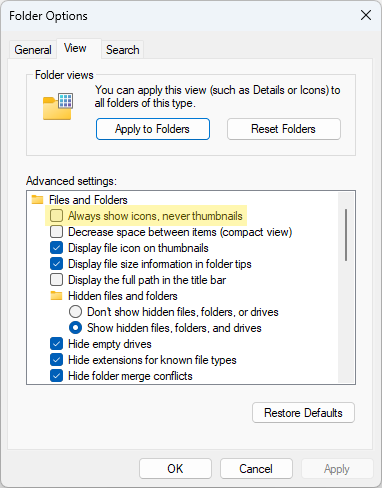
In File Explorer open folder options and make sure the Always show icons, never thumbnails option is disabled.
Thumbnails for placeholder files in file managers
Certain file managers, such as Total Commander, do not support thumbnails for placeholder files. In such cases, the system may need to fully hydrate the file to generate a thumbnail. This can lead to a delay in thumbnail display and might require reloading the contents of the folder.
macOS
Thumbnail previews for placeholder files accessed over SMB are enabled by default.
Thumbnail previews for local placeholder files with the TSS are enabled by default.
In Agents 5.0.x and older, you can disable previews, by adding the fs_fuse_download_block_list custom parameter to the Agent Profile with the following value:
Finder.app;QuickLook;com.apple.appkit.xpc.openAndSavePanelService;/usr/libexec/lsd;com.apple.iTunesLibraryService;/System/Library/CoreServices/iconservicesagent;/System/Applications/Music.app/Contents/MacOS/Music;/System/Library/PrivateFrameworks/AMPLibrary.framework/Versions/A/Support/AMPLibraryAgent;/Applications/CleanMyMac X.app;/Applications/Resilio Connect Agent.app/Contents/MacOS/Resilio Connect Agent;/System/Library/Frameworks/CoreServices.framework/Versions/A/Frameworks/Metadata.framework/Versions/A/Support/mds;/System/Library/ExtensionKit/Extensions/ImageThumbnailExtension.appex/Contents/MacOS/ImageThumbnailExtension;/System/Library/ExtensionKit/Extensions/AudiovisualThumbnailExtension.appex/Contents/MacOS/AudiovisualThumbnailExtension;/System/Library/ExtensionKit/Extensions/OfficeThumbnailExtension.appex/Contents/MacOS/OfficeThumbnailExtension
Resilio 6.0
You cannot prevent thumbnail previews rendering for local placeholder files in Resilio 6.0 and newer.
To optimize local storage usage, enable Progressive Hydration by adding the tss_hydration_policy: 0/1 parameter to the Job policy. For details, see File streaming: progressive Hydration in TSS.
Linux
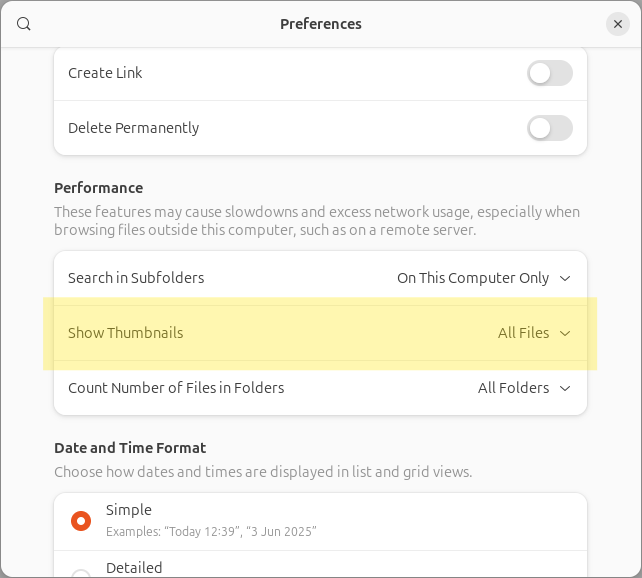
To enable thumbnail previews for placeholder files accessed over SMB, in file manager's preferences, in the Performance section, select the option to show thumbnails for all files.