High availability groups
Feature availability
Available from: Resilio Active Everywhere 4.0.
Available for: Windows, Linux Agents. Full sync shares.
Not available for: NAS, macOS, mobile Agents. Caching gateways, TSS shares. Run Script Jobs.
Understanding high availability groups
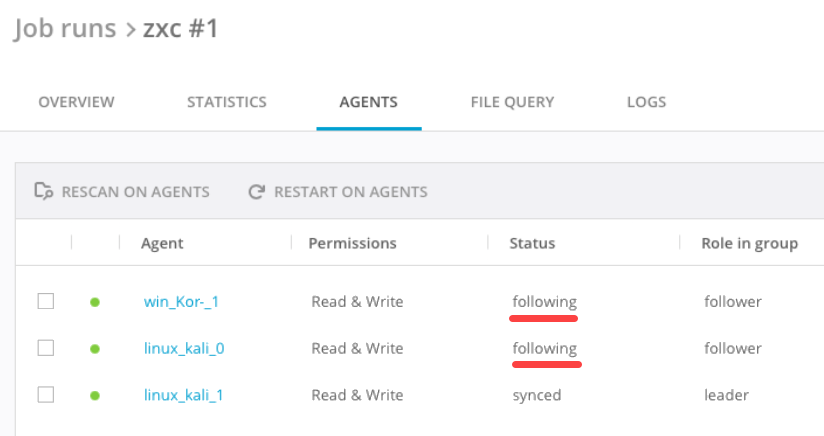
Agents in high availability (HA) groups operate work in an active/passive mode. Automatically a group leader is elected, who performs all the synchronization and data transfer. Other Agents work in 'follower' mode, keeping the metadata in sync, but not actively participating in the Job run. Corresponding status - following - is reported in a Job run for them.
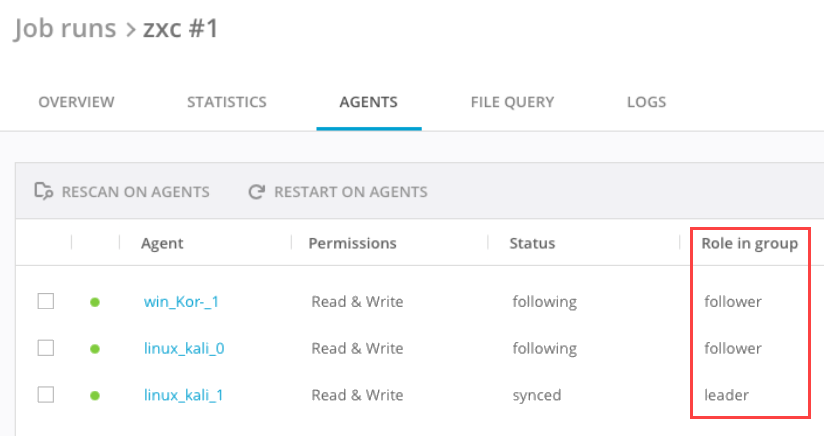
Additionally, corresponding Role in HA group is reported in a Job run - leader or follower:
When the leader fails for a reason - it goes offline or encounters a critical error - a new leader is elected among the available followers. After successful failover the Job continues from where it was interrupted. For failover peculiarities see paragraph below.
Failover
Failover is the process that is triggered if the group leader fails to execute the Job:
-
It's disconnected from followers in the Job.
It means that restarting the Agent process, either right on the server where it's installed or from the Management Console, automatically triggers the failover in all the Jobs, where this Agent is the HA group leader.Note, the key point here is connection to other Agents in HA group, but not to the Management Console. The leader may be not connected to the Management Console, but is connected to other Agents and in this case failover won't occur. -
The Job's .sync/ID file is deleted, this applies only to synchronization Jobs - local or cloud storages.
- It encounters Database error.
A number of activities is performed during this process, as a result a new leader is elected and it continues the Job.
There's no way for Resilio administrator to explicitly choose the new leader, Management Console does not select the new leader either. Resilio's internal algorithm is used for that.
During failover Agents in HA group report status failover in the Job run and a corresponding event is reported in their Jobs' logs.
The failover process takes approximately 30 seconds.
In Resilio 5.0.8 and older versions, the new leader must perform a complete Job folder scan before it continues the Job. This is applicable to local and cloud storage sources. If metadata synchronization to cloud storage is disabled, rescanned files will receive a new Date Modified timestamp. This can cause the receiving Agents to detect the files as updated, leading to either a re-upload of the files to cloud storage or simply updating the Date Modified timestamp without changing the file content. In Distribution or Consolidation Jobs the destination Agents won't be able to seed such files.
In Resilio 5.0.9 and newer, the new leader synchronizes the Job folder tree with the Cluster Leader and continues the Job without performing a complete scan. See Metadata synchronization on failover for more details.
If a new leader is not elected for a reason, the failover process continues until it's elected or the election process times out.
During the failover, Agents do not report any information about the Job run's progress and its details.
While the Agents work in the Highly Available mode, some of the operations are interrupted by the failover and started again after it, for example:
- Initial indexing of the Job (when the Agent scans the folder and builds the folder database).
- Trigger execution in a Distribution/Consolidation Job, the new leader will start these from scratch.
- File download from the leader. If Lazy indexing parameter in the Profile is enabled, remote Agents, outside of the HA group that download the file from the HA leader, will re-start the file download from the new leader.
Metadata synchronization on failover
Feature availability
Metadata synchronization is available in Resilio 5.0.9 and newer, applicable to scale-out cluster and high availability groups.
This feature makes branch synchronization more efficient by allowing followers and newly assigned branch leaders to synchronize the Job file tree without performing complete scans, filesystem events handling, metadata merges, or storage access.
The key concepts of metadata synchronization are folder tree versioning and incremental journal files, where the Branch Leader stores the modified file entries (folder tree version), and announces it to other cluster members via Cluster Leader. Branch Followers synchronize the changes periodically.
Journal files are stored in the .sync in the Agent's storage folder and have a rotation policy. On failover, the new Branch Leader verifies with the Cluster Leader that it has received the latest journal file with the latest files tree version.
Upgrade from a previous version
After upgrading to 5.0.9, initial folder scan will be performed for existing Jobs in order to create journal files. New Jobs have the metadata synchronization enabled by default.
Important: Limitations apply
Initial folder synchronization may start in some cases when the new Branch Leader fails to synchronize the latest folder tree version with the Cluster Leader. Corresponding system events are recorded for the Job. For additional considerations regarding metadata synchronization, see known limitations.
Create HA group
A high availability group can be created in advance before creating a Job, or during Job creation. It's only supported for Agents running on Windows or Linux OS. All Agents in the group must run on the same hardware architecture and operating system.
A high availability group must contain at least one Agent.
Automatic sorting of Agents is also supported. The Resilio administrator must ensure that the auto-sorting rules guarantee that there is at least one Agent in the group. Agents won't be automatically added to a HA group in the following cases:
- It's a macOS Agent
- It's a different OS than other Agents in the HA group
- It's an Agent version older than 4.0
- It does not have the Storage connectors feature in its license package
Using the HA groups in the Job
High availability groups are supported in the following Job types, with the limitations listed in the Peculiarities and limitations section:
- Synchronization
- Distribution
- Consolidation
- File Caching (as a Primary storage Agent)
- Hybrid Work (as a Primary storage Agent)
All Agents in the HA group synchronize the same physical location. If the storage location is misconfigured, the followers report the error and cease synchronization.
Only direct path or a storage connector location are supported.
High availability groups can be selected as a Priority Agent in a Job.
Path macros are not supported for HA groups, and if used, the behavior will be undefined.
Changing the Job path for an already configured Job is not supported, you need to remove the group from the Job and add it again with a new path.
Job run details and its progressing - number of files, size of the Job, etc. - are reported by the leader. Followers' information is not taken into consideration. For getting the correct understanding and expectations of how the Job run is progressing, all leaders in HA groups in this Job must be elected (not in the process of failover) and online (connected to MC). Otherwise the Job's progress will be reduced accordingly.
Follower Agents do not report the following to the Management Console:
-
Job runs table: transfer progress %, Agents completed %, Agents in progress %, Transfer ETA, Size, Data/files transferred, Files completed %
- Job run > Overview tab: ETA, Total bytes/files in Job, Total bytes/files to transfer.
- Job run > Statistics tab: Bytes transferred, files transferred.
- Job run > Agents tab: All statistics is hidden from UI . Available are only Group, Role in group, Errors, Peers, Status, and some static information like OS, OS user, version, permissions, host, etc.
- Job run > Agent > Overview tab: Speed and Transfer sections, Start/Finish time, Priority (for leaders as well), Bytes/Files to receive, ETA, Archive size (managed by agent as well).
- Job run > Agent > Active files tab: Contents of the entire whole tab is not available for followers.
-
Agents table: Total files/size
- Agent > Overview tab: Total files/size
Synchronization/Caching/Hybrid work Jobs
HA groups can be used in these Jobs with the "not supported" limitations listed in the Peculiarities and limitations section.
Synchronization of file permissions is supported. A Reference Agent must be selected in such a Job. A whole HA group can be selected as a Reference Agent. See here for more details about Reference Agent in general and working with HA groups in particular.
Cross-platform synchronization of file permissions
Using Highly Available groups on a system that cannot apply the replicated permissions (for example, on a Linux with replicated NTFS permissions or vice versa) should be avoided. It may lead to unexpected permissions issues and access problems. Always ensure that HA groups are used on systems with compatible file permission structures.
For HA groups, working in a Job with Read-Only access, option "Overwrite any changed files" from the Agent profile must be set to "Yes". Otherwise, if it's "No", Agents in such a group won't be able to properly detect the file changes and the Job will stuck.
Distribution/Consolidation Jobs
HA groups can be used as source or destination in these Jobs.
All triggers in the Job are executed by the leader in the HA group. If failover happens during script execution, the newly elected leader starts executing the script from scratch.
An active Job run can be stopped on an Agent from HA group - the Job run is stopped for all Agents in the group.
Adding new agents to an active Job run with a HA group in it is not supported.
Restarting the Job run that has a HA group in it is not supported, Agents will report the error about the misconfigured storage path.
Job run will be aborted on all agents in HA group in case of some error, which is added to "Abort on error" list, appeared on the group leader. "Agent offline" error is ignored on all HA agents.
Tags AGENT_NAME and AGENT_ID are supported for HA groups. The name and ID of the HA group will be used.
Peculiarities and limitations
-
Not supported:
- All Agents of version older than 4.0.0
- macOS, mobile Agents, Agents install on NAS devices
- Run Script Jobs
- Path macros for HA groups
- Changing the Job path for HA group
- Adding new Agents to a Job run or restarting a Job run that has a HA group
- Network policy rules
- Job priorities
-
Temporary error "Share's identifying .sync/ID file is broken" for HA groups may appear after changing the Job type or recreating the Job using the same files storage.
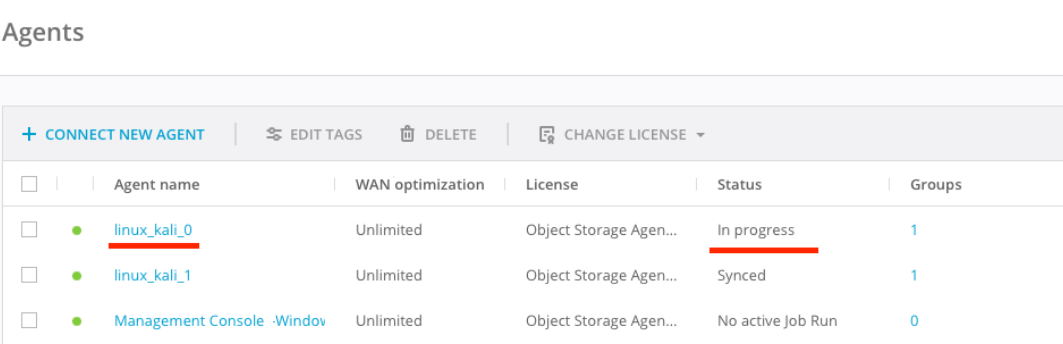
- For Management Console older than 4.2: Followers in an HA group are reported as "In progress" in idle synchronization Jobs. They are also counted in the percentage of "Agents in progress" in a Job run.